# React Native
{% hint style="warning" %}
**Before you start**
To set up the PubScale Offerwall, you’ll need to add your app to our platform. Follow this guide for instructions on [how to set up your app](https://pubscale.gitbook.io/offerwall-sdk/1.0.10/basic-integration/setting-up-your-app). Once completed, you will receive a unique 8-digit app ID.
{% endhint %}
## 1. Add this to your build.gradle file
Add the below line inside the **dependencies** block in your build.gradle file
{% tabs %}
{% tab title="Kotlin Script" %}
```kts
implementation('com.pubscale.sdkone:offerwall:1.0.10')
```
{% endtab %}
{% tab title="Groovy" %}
```groovy
implementation 'com.pubscale.sdkone:offerwall:1.0.10'
```
{% endtab %}
{% endtabs %}
## 2. Configure proguard rules
For the SDK to work properly in release(obfuscated/minified) builds, add the following rules in your proguard-rules.pro file.
{% code title="proguard-rules.pro" %}
```properties
-keep class com.pubscale.sdkone.offerwall.** {*;}
-keep class com.pubscale.caterpillar.analytics.** {*;}
#Supporting R8 full mode
-keep,allowobfuscation,allowshrinking class kotlin.coroutines.Continuation
-keep,allowobfuscation,allowshrinking interface retrofit2.Call
-keep,allowobfuscation,allowshrinking class retrofit2.Response
```
{% endcode %}
We have added the SDK to the project. Learn how to initialize the SDK in the next step
## 3. Add native module files
Add the following files to your android app's module directory.
* [PubscaleOfferwallSdkModule.java](https://storage.googleapis.com/pubscale-offerwall/lib/PubscaleOfferwallSdkModule.java)
* [PubscaleOfferwallSdkPackage.java](https://storage.googleapis.com/pubscale-offerwall/lib/PubscaleOfferwallSdkPackage.java)
### 3.1. Link the module
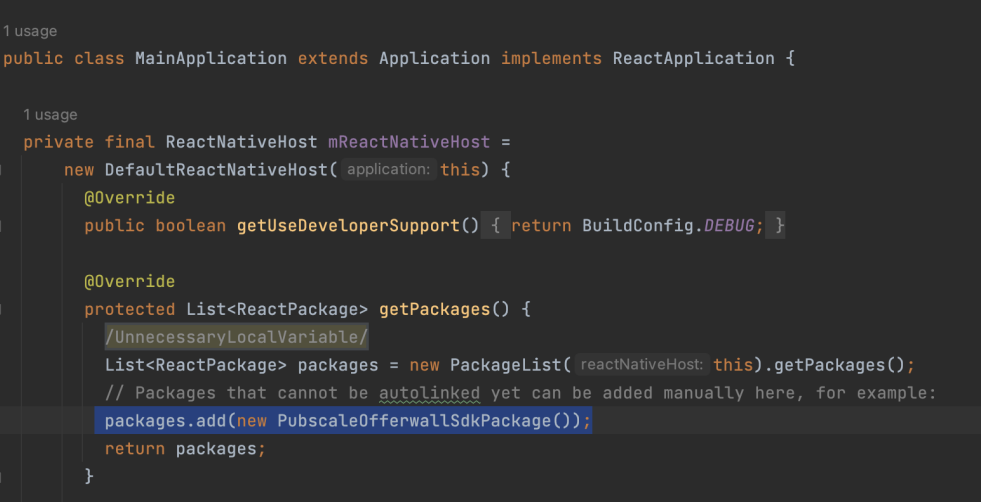
Add the following line inside the getPackages() method of MainApplication class.
`packages.add(new PubscaleOfferwallSdkPackage());`
Adding PubscaleOfferwallSdkPackage to React packages
## 4. Initialize the SDK
To initialize the SDK, call the PubscaleOfferwall.init() method.
Pass the app\_id (generated from the console) as the first parameter of the init method. Make sure to call the init method as soon as your app starts up, ideally in app.js or index.js.
{% hint style="info" %}
Obtain your **app\_id** from the [PubScale Dashboard](https://dashboard.pubscale.com) by [adding your app and configuring the offerwall.](https://pubscale.gitbook.io/offerwall-sdk/1.0.10/basic-integration/setting-up-your-app) Once completed, you will receive a unique 8-digit app ID.
{% endhint %}
#### Optional Parameters:
| Parameter | Description |
| ---------------------- | ------------------------------------------------------------------------------------------------------------------------------------------------------------------------- |
| **user\_id** | Pass your user's id in this field to tag your user. This id will be sent along with the S2S callback. Make sure to call the init function every time the user id changes. |
| **background\_Base64** | An image that will be displayed as a banner on top of the offer wall. Pass the image in base64 encoded format. The background will be black by default. |
| **appicon\_Base64** | An image that will be displayed in the center on the top banner of the offerwall. Pass the image in base64 encoded format. Default value is the app icon. |
### 4.1. Making the Init call
{% hint style="info" %}
Use sandbox environment app ID for testing purposes.
[sandbox-environment](https://pubscale.gitbook.io/offerwall-sdk/1.0.10/sandbox-environment/sandbox-environment "mention") - Learn how to setup Sandbox environment
{% endhint %}
```jsx
import {NativeModules, Alert} from 'react-native';
const {PubscaleOfferwall} = NativeModules;
//initialises the SDK.
//call init once the user is logged in.
PubscaleOfferwall.init( "app_id", {
"user_id": "test-user", //optional, but require to tag user to offer completion.
"background_Base64": base64Image,
"appicon_Base64": app64Image, //optional
}, () => { //onSuccess Callback
console.log("success")
}, (errMsg)=>{ //onFailure Callbacks
console.log(errMsg)
})
```
## 5. Start the OfferWall
To start the offerwall, just call, `PubscaleOfferwall.launch()` method.
```jsx
PubscaleOfferwall.launch(() => {
console.log("close"); //onClose
}, (errMsg) => {
console.log(errMsg); //onFailure
});
```
## 6. Setup S2S callbacks
Setup the S2S callbacks to get instant updates whenever the user gets the reward. You can use this callback to reward the user in your application. [Learn more.](https://pubscale.gitbook.io/offerwall-sdk/1.0.10/s2s-callback-configuration)
## 7. Test the OfferWall
{% hint style="info" %}
Please use the sandbox environment for testing purposes to get instant callbacks and rewards. To learn how to enable the Sandbox environment, [click here](https://pubscale.gitbook.io/offerwall-sdk/1.0.10/sandbox-environment/sandbox-environment).
{% endhint %}
Finally, To test the offerwall, build the application to an actual device. Check if you can launch the Offerwall and get the appropriate callbacks.