# API

By integrating this API, publishers can seamlessly fetch and display these offers within their own user interface.  This allows for the creation of fully native and personalised in-app experiences that align with the app’s design and user flow, enhancing user engagement and improving conversion rates.

{% hint style="danger" %} <mark style="color:red;">Pre-approval from PubScale team is required for the offerwall integration. Please contact your account manager or reach out to support before starting this integration.</mark>  [<mark style="color:red;">Learn More</mark>](https://pubscale.gitbook.io/offerwall-sdk/1.0.10/faqs#how-to-approval-for-web-integration)
{% endhint %}

## 1. Authentication

In order to access offers API. Following Keys need to be generated.

1. Pub Key (Generated once per publisher)
2. App ID&#x20;

#### App-ID

In order to generate an App ID  follow this guide for instructions on [how to set up your app](https://pubscale.gitbook.io/offerwall-sdk/1.0.10/basic-integration/setting-up-your-app). Once completed, you will receive a unique 8-digit App ID. This will be used as App ID to access the API.

#### Pub-Key

In order the generate a Publisher Key a pre-approval is required. This is a one time approval for a publisher. Please contact account manager for the same.

After your account is approved, you can proceed with the following steps to generate your Publisher API Key.

{% hint style="danger" %}
**When you regenerate the Offerwall API Key, the new key will apply to all apps linked to your account.**
{% endhint %}

#### Steps:

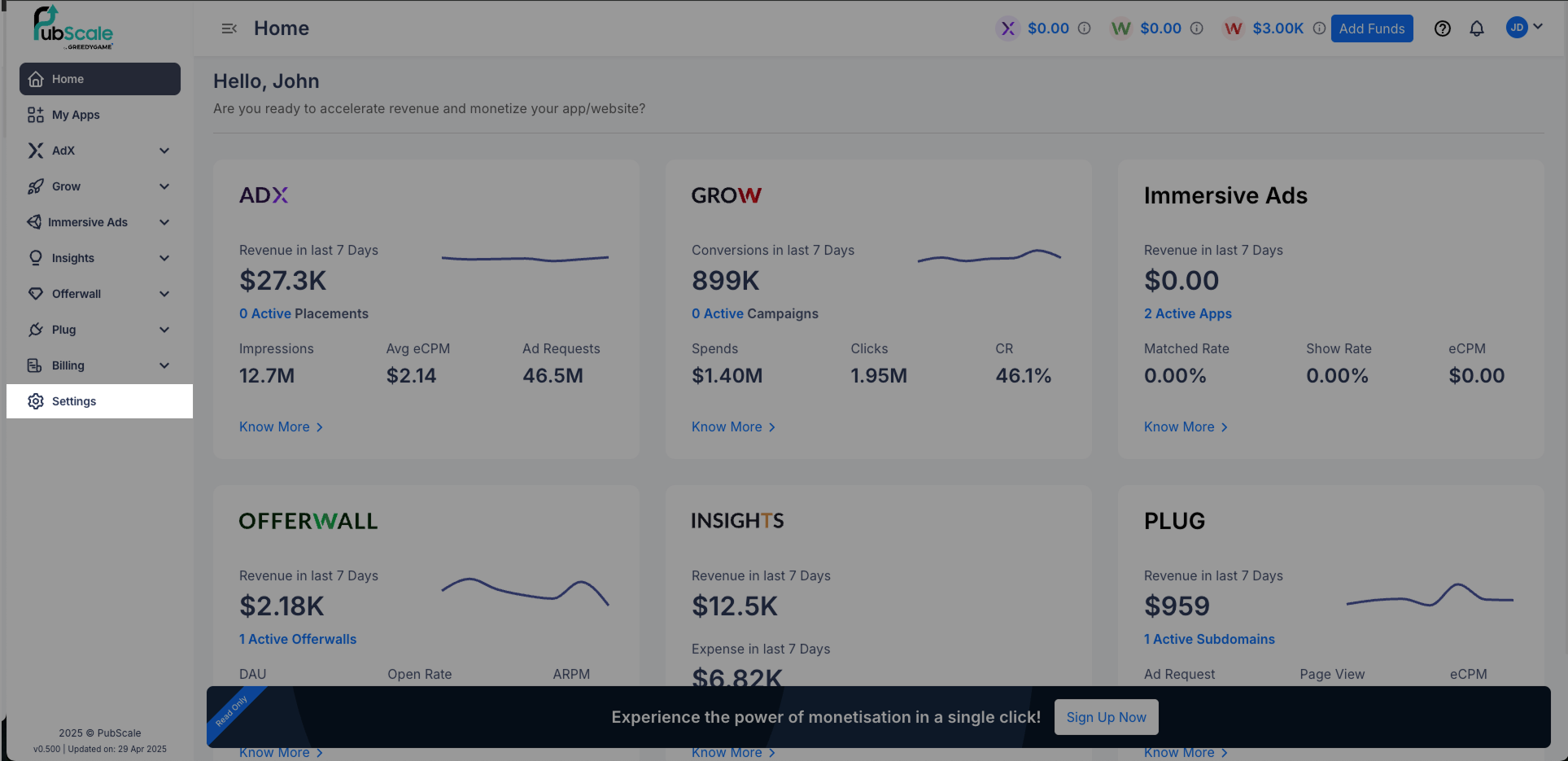
1. Once logged in, you’ll find Settings in the side navigation panel.

<figure><img src="https://4253310960-files.gitbook.io/~/files/v0/b/gitbook-x-prod.appspot.com/o/spaces%2FwtFu5cQcg9ZXDSngP2aN%2Fuploads%2FLzR9y0rl7Ktqmh2mp8M9%2F1.png?alt=media&#x26;token=5672c74a-5251-410b-b997-63b0923f68b2" alt=""><figcaption></figcaption></figure>

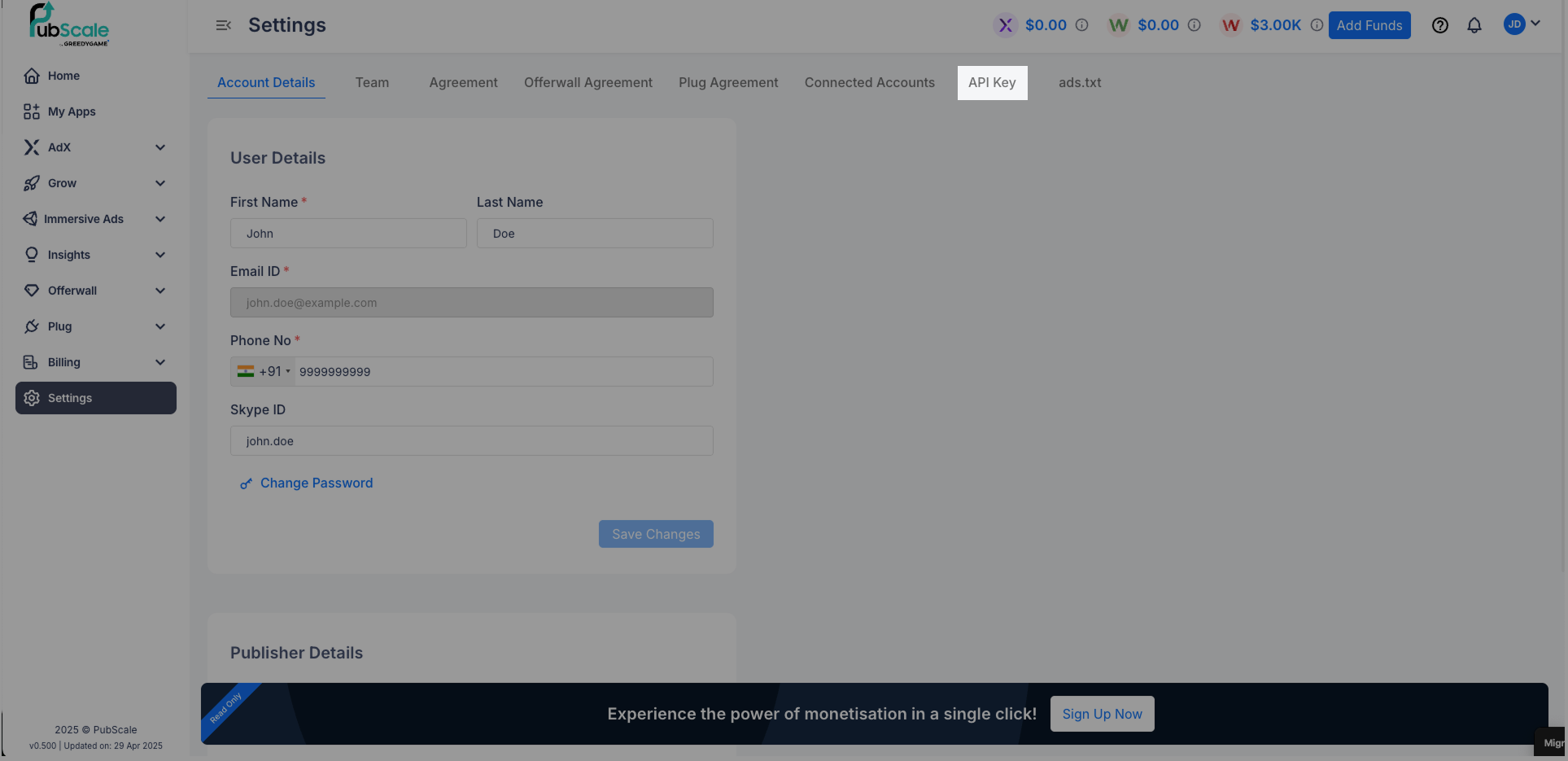
2. Go to the API Key section to generate your Offerwall API key. If you don't see this section, please contact your account manager for enabling access.

<figure><img src="https://4253310960-files.gitbook.io/~/files/v0/b/gitbook-x-prod.appspot.com/o/spaces%2FwtFu5cQcg9ZXDSngP2aN%2Fuploads%2Fvvxyxxm8IhUk6EukFbVo%2F2.png?alt=media&#x26;token=734fde72-9169-4094-8dba-2ee7d627240c" alt=""><figcaption></figcaption></figure>

3. Navigate to the Offerwall API section to access and create your Offerwall API key.

<figure><img src="https://4253310960-files.gitbook.io/~/files/v0/b/gitbook-x-prod.appspot.com/o/spaces%2FwtFu5cQcg9ZXDSngP2aN%2Fuploads%2F9LbRADkCv47wyFGAK56w%2F3.png?alt=media&#x26;token=c5c01bb9-6363-4e37-bbb2-38469aa8a75f" alt=""><figcaption></figcaption></figure>

4. Please copy the key from the image and paste it into your Offerwall API setup.

<figure><img src="https://4253310960-files.gitbook.io/~/files/v0/b/gitbook-x-prod.appspot.com/o/spaces%2FwtFu5cQcg9ZXDSngP2aN%2Fuploads%2FkLx6pyQz5jerPC0XG5O4%2F4.png?alt=media&#x26;token=2e6db12f-36ad-4005-9fed-d6e897764e38" alt=""><figcaption></figcaption></figure>

***

## 2. Offers API:

### Description:

The API provides a list of offers available for your app, which can be used to display and run offers on your platform.

{% hint style="warning" %}
Offers are cached on our server and refreshed every 5 minutes. We recommend updating your inventory accordingly.
{% endhint %}

### Endpoint:

```http
POST https://api-ow.pubscale.com/v1/offer/api
```

#### Auth:

The keys generated in the previous steps must be included in the following headers when making API requests.

These are **Mandatory** for accessing the API.

* **App-Id** – The unique App ID generated for your app during the setup process.
* **Pub-Key** – The unique key generated for your publisher account during setup. This key is shared across all apps within the same account.

### Example:

```bash
curl 'https://api-ow.pubscale.com/v1/offer/api' \
--header 'App-Id: <Your App ID>' \
--header 'Pub-Key: <Your Pub Key>' \
--header 'Content-Type: application/json' \
--data '{
    "page": 1,
    "size": 1000,
    "filt": [
        {
            "dim": "offer_type",
            "match": {
                "type": "any",
                "value": [
                    "CPI"
                ]
            }
        }
    ]
}'
```

### Payload:

<table><thead><tr><th width="96.71484375">Body</th><th width="114.2890625">Required<select><option value="ayz8CUuKLO37" label="Required" color="blue"></option><option value="57fs7liC9YuB" label="Optional" color="blue"></option></select></th><th width="105.1484375">Type</th><th>Description</th></tr></thead><tbody><tr><td>page</td><td><span data-option="ayz8CUuKLO37">Required</span></td><td>Integer</td><td>The <code>page</code> field in the Offers API response indicates the current page number and should always be a positive integer.</td></tr><tr><td>size</td><td><span data-option="ayz8CUuKLO37">Required</span></td><td>Integer</td><td>The <code>size</code> field in the Offers API response represents the number of offers returned in that response and should always be a positive integer.</td></tr><tr><td>filt</td><td><span data-option="57fs7liC9YuB">Optional</span></td><td>Array</td><td>Contains an array of filters to be applied to the Offers API request to refine the results based on specified criteria.</td></tr><tr><td>dim</td><td><span data-option="57fs7liC9YuB">Optional</span></td><td>String</td><td>Specifies the dimension on which the filter is applied. Supported values are <code>offer_type</code>, <code>platform</code>, and <code>country</code>.</td></tr><tr><td>match</td><td><span data-option="57fs7liC9YuB">Optional</span></td><td> Model</td><td>Contains details about the filter to be applied, including the values to filter by and the match type used for filtering.</td></tr><tr><td>type</td><td><span data-option="57fs7liC9YuB">Optional</span></td><td>String</td><td>Specifies the match type to be used for the filter. Supported values are <code>any</code> (matches any of the provided values) and <code>exact</code> (requires a single, exact value match).</td></tr><tr><td>values</td><td><span data-option="57fs7liC9YuB">Optional</span></td><td>Array</td><td>Contains the values to apply the filter on. Allowed values depend on the specified filter dimension.</td></tr></tbody></table>

<details>

<summary>Filter Values</summary>

**Offer Type**:

* `CPR` – Cost Per Registration
* `CPI` - Cost Per Install
* `CPL` – Cost Per Lead
* `CPC` – Cost Per Click
* `CPE` – Cost Per Engagement
* `CPA` – Cost Per Action
* `APK_INSTALL` – APK-based Install
* `APK_REGISTER` – APK-based Registration

**Example Curl:**

```bash
curl --location 'https://api-dev.sikkaapp.in/v1/offer/api' \
    --header 'App-Id: 77754913' \
    --header 'Pub-Key: 09DAE7FB5D9AA83582DE7703348D8087' \
    --header 'Content-Type: application/json' \
    --data '{
            "page": 1,
            "size": 1000,
            "filt": [
            {
                "dim": "offer_type",
                "match": {
                        "type": "any",
                        "value": [
                            "CPI","CPA"
                        ]
                }
            }
            ]
        }' -v
```

**Platforms**

* `ios` – Apple iOS platform
* `android` – Android platform
* `web` – Web-based platform

**Example Curl:**

```bash
curl --location 'https://api-dev.sikkaapp.in/v1/offer/api' \
    --header 'App-Id: 77754913' \
    --header 'Pub-Key: 09DAE7FB5D9AA83582DE7703348D8087' \
    --header 'Content-Type: application/json' \
    --data '{
            "page": 1,
            "size": 1000,
            "filt": [
            {
                "dim": "platform",
                "match": {
                        "type": "any",
                        "value": [
                            "web","ios","android"
                        ]
                }
            }
            ]
        }' -v
```

**Country**

* Countries must be specified using the **standard ISO Alpha-2 country codes** (e.g., `US` for United States, `IN` for India, `FR` for France).

**Example Curl:**

```bash
curl --location 'https://api-dev.sikkaapp.in/v1/offer/api' \
    --header 'App-Id: 77754913' \
    --header 'Pub-Key: 09DAE7FB5D9AA83582DE7703348D8087' \
    --header 'Content-Type: application/json' \
    --data '{
            "page": 1,
            "size": 1000,
            "filt": [
            {
                "dim": "country",
                "match": {
                        "type": "any",
                        "value": [
                            "IN","US"
                        ]
                }
            }
            ]
        }' -v
```

</details>

***

### Example Response:

```json
{
    "offers": [
        {
            "id": "973839",
            "upd_ts": 1745834294,
            "off_type": "CPI",
            "s_id": "nova.solitaire.patience.card.games.klondike.free",
            "name": "Classic Solitaire : Card Game",
            "lp_url": "https://play.google.com/store/apps/details?id=nova.solitaire.patience.card.games.klondike.free",
            "pyt": {
                "cur": "USD",
                "amt": 0.0325
            },
            "inapp_pyt": {
                "cur": "Bullets",
                "amt": 4.875
            }
            "crtvs": {
                "ic_url": "https://play-lh.googleusercontent.com/TIogtAtBq22AAHUK8q0nkXVi3KPPssCqIjp2J5JmLLuw8sdStdpeiRsPg1STEIo2ng"
            },
            "desc": {
                "raw": "Classic Solitaire : Card Game"
            },
            "ctg": [
                "SINGLE_STEP"
            ],
            "gls": [
                {
                    "id": "2710875",
                    "gl_val": null,
                    "ttl": "Complete Install and Use The App",
                    "instr": "1.Click on redeem now.\n2.Install the app.\n3.Use the app.\n4.Explore the app and enjoy.",
                    "pyt": {
                        "cur": "USD",
                        "amt": 0.0325
                    },
                    "inapp_pyt": {
                        "cur": "Bullets",
                        "amt": 4.875
                    },
                    "ord": 1
                }
            ],
            "trk_url": "https://api-ow.pubscale.com/v2/tracking/click?rid=2710875&app=77754913&user_id={your_user_id}&gaid={gaid_for_android}&idfa={idfa_for_ios}",
            "geo_tgt": {
                "include": [
                    "AT"
                ],
                "exclude": []
            },
            "os": "android",
            "metrics": [
                {
                    "m_type": "GLOBAL",
                    "cr": 80,
                    "epc": 23.87
                }
            ]
        }
    ],
    "total": 1931
}
```

<details>

<summary>Response Details</summary>

<table><thead><tr><th width="212.62109375">Field</th><th>Description</th></tr></thead><tbody><tr><td><code>offers</code></td><td>An array containing the offer details. Each element represents an individual offer.</td></tr><tr><td><code>id</code></td><td>A unique identifier for the offer.</td></tr><tr><td><code>upd_ts</code></td><td>The timestamp when the offer was last updated (in UNIX timestamp format).</td></tr><tr><td><code>off_type</code></td><td>The type of offer (e.g., <code>CPI</code> for Cost Per Install, <code>CPC</code> for Cost Per Click, etc.).</td></tr><tr><td><code>s_id</code></td><td>The unique identifier for the app associated with the offer.</td></tr><tr><td><code>name</code></td><td>The name of the app or offer.</td></tr><tr><td><code>lp_url</code></td><td>The link to the landing page for the app (usually a store link).</td></tr><tr><td><code>pyt</code></td><td>Payment details for the offer. Contains <code>cur</code> (currency) and <code>amt</code> (amount).</td></tr><tr><td><code>inapp_pyt</code></td><td>Displays payout details in the application's currency, with <code>cur</code> representing the currency name and <code>amt</code> the amount, based on app settings.</td></tr><tr><td><code>crtvs</code></td><td>Creatives related to the offer. Contains <code>ic_url</code> (URL to the icon image).</td></tr><tr><td><code>desc</code></td><td>Description of the offer. Contains <code>raw</code> (raw description text).</td></tr><tr><td><code>ctg</code></td><td>Categories associated with the offer (e.g., <code>SINGLE_STEP</code>).<br><strong>Possible values</strong>: <code>SINGLE_STEP</code>, <code>MULTI_REWARD</code>, <code>DEPOSIT</code>, <code>GAMING</code>, <code>FINANCE</code>, <code>SURVEY</code>, <code>NEW</code></td></tr><tr><td><code>gls</code></td><td>A list of goals for the offer. Each goal has <code>id</code>, <code>gl_val</code> (value), <code>ttl</code> (title), <code>instr</code> (instructions), and <code>pyt</code> (payment details) and <code>inapp_yt</code>(payment in apps currency).</td></tr><tr><td><code>trk_url</code></td><td>Tracking URL for tracking user actions like clicks or installs, with placeholders for dynamic user data.</td></tr><tr><td><code>geo_tgt</code></td><td>Geographical targeting information. Contains <code>include</code> (countries to include) and <code>exclude</code> (countries to exclude).</td></tr><tr><td><code>os</code></td><td>The operating system platform for the app (e.g., <code>android</code>, <code>ios</code>).</td></tr><tr><td><code>total</code></td><td>The total number of offers available (in this case, <code>1931</code> offers).</td></tr><tr><td><code>metrics</code></td><td>Contains performance metrics related to the offer, including CR (Conversion Rate) and EPC (Earnings Per Click). Currently, only global values are supported.</td></tr></tbody></table>

</details>

***

## 3. Click Parameters:

You can use the tracking link provided in the `trk_url` field of each offer in the API response to start sending click events to Pubscale. This tracking link is essential for monitoring user interactions and attributing tasks correctly.

Purpose

The `trk_url` is used to track clicks from users on a particular offer. When a user interacts with an offer, your app or system should trigger this URL with the appropriate parameters.

***

#### Supported Click Parameters

The following query parameters are supported for integration with the tracking URL:

<table><thead><tr><th width="110.36328125">Parameter</th><th width="135.38671875">Required<select><option value="r6YF13yxr2ao" label="Manadatory" color="blue"></option><option value="GxGROTgiXs3h" label="Optional" color="blue"></option><option value="h2o5Y8NKC6hD" label="Recomended" color="blue"></option></select></th><th>Description</th></tr></thead><tbody><tr><td><code>user_id</code></td><td><span data-option="r6YF13yxr2ao">Manadatory</span></td><td>The unique identifier of the user who clicks on the offer. This will be included in the callback. Special characters aren't allowed except "_","@","-" and ".".</td></tr><tr><td><code>gaid</code></td><td><span data-option="h2o5Y8NKC6hD">Recomended</span></td><td>Google Advertising ID (required for Android users).</td></tr><tr><td><code>idfa</code></td><td><span data-option="h2o5Y8NKC6hD">Recomended</span></td><td>Identifier for Advertisers (required for iOS users).</td></tr><tr><td><code>c1-c5</code></td><td><span data-option="GxGROTgiXs3h">Optional</span></td><td>Custom parameters can be appended to the tracking URL by the publisher and will be included in the callback for reference. Special characters aren't allowed except "_","@","-" and "."</td></tr></tbody></table>

## 4. Setup Server-to-Server(S2S) callbacks <a href="#id-3.-test-the-offerwall" id="id-3.-test-the-offerwall"></a>

{% hint style="success" %}
This step is manadatory for rewarding users.
{% endhint %}

Set up the Server-to-Server (S2S) callbacks to receive instant updates whenever a user completes an offer and earns a reward. When an offer is completed, our server will send a notification to the configured callback URL. This callback provides the necessary information to process and verify the reward for the user in your application. [Learn more.](https://pubscale.gitbook.io/offerwall-sdk/1.0.10/server-to-server-s2s-callback-configuration)
